Turn inspection information into professional survey reports
Write your report with the relevant inspection notes, photographs, voice memos and research alongside each section. SurvSync brings the supporting information and report-writing tools into one workspace.
The Report Builder workspace
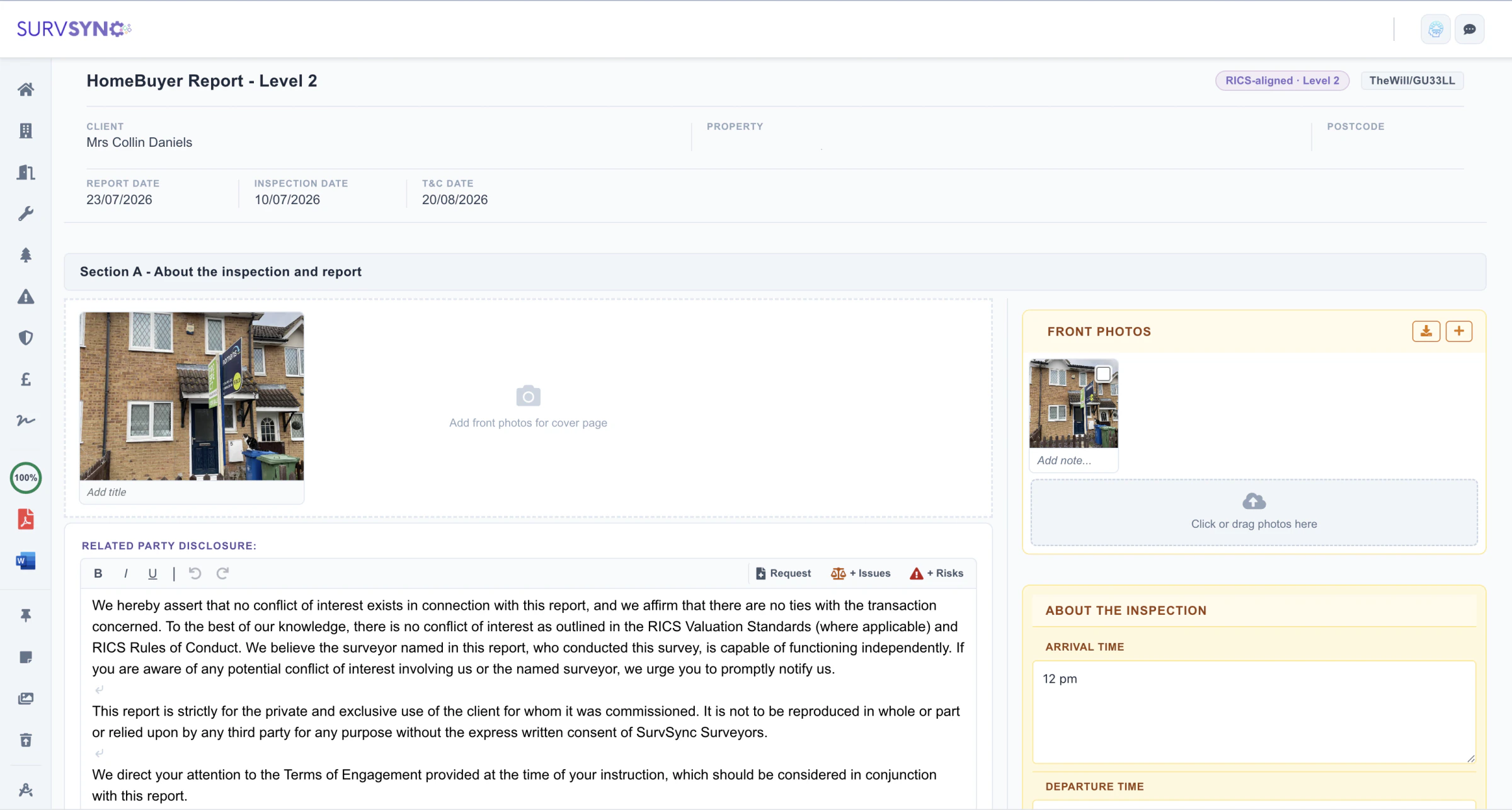
The SurvSync Report Builder is a dedicated survey report writing workspace where residential surveyors prepare and complete their reports.
When a report is opened, SurvSync already knows which template has been assigned to that instruction. The correct report structure is loaded automatically, with all relevant sections ready for completion.
Appropriately licensed surveyors can use the supported RICS standard templates for Level 1, Level 2 and Level 3 surveys, alongside SurvSync's own RICS-aligned report templates and a flexible, non-rigid valuation report builder.
Although each report type contains different sections and requirements, the overall reporting workflow remains familiar and consistent.
 Enlarge image
Inspection information alongside your report
A key part of the Report Builder is the information panel alongside the report itself.
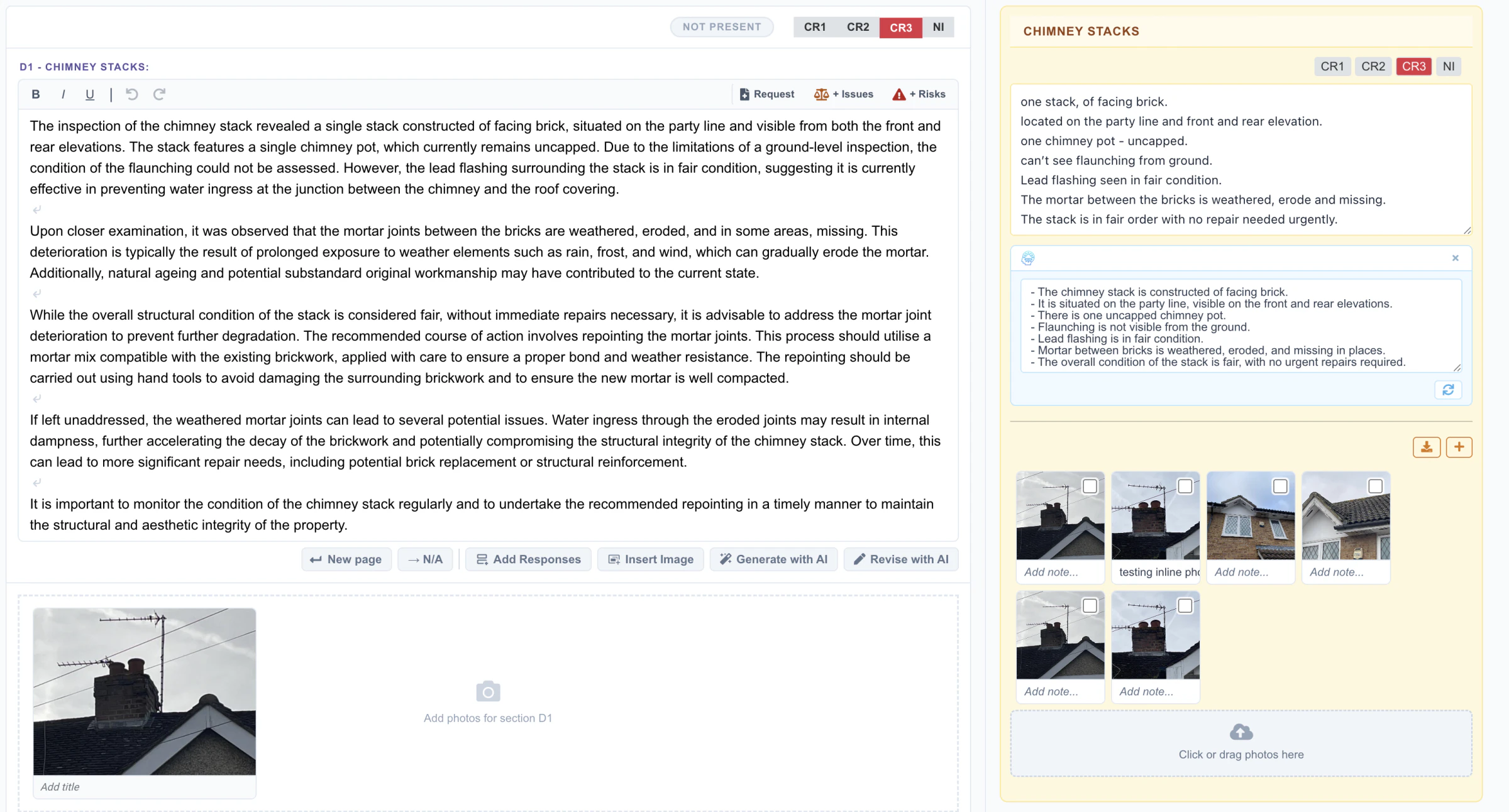
Inspection information collected within SurvSync is organised against the relevant report sections. Depending on the section, the surveyor can access associated inspection notes, risk notes, legal notes, photographs, voice memos and AI Copilot notes without having to search through separate files or systems.
This means each report section already knows where its supporting inspection information is located, helping the surveyor move directly from site observations to report writing.
Consolidated inspection notes
All inspection notes are available within a dedicated area alongside the report. This gives the surveyor one place to review the information collected during the inspection while writing the report. Inspection notes can also be exported as a PDF where required.
Connected to the SurvSync Mobile App
The Report Builder works directly with the SurvSync mobile application. Inspection notes, photographs, floorplans, voice memos and other inspection data are synchronised between the SurvSync web platform and the mobile app.
Information recorded during the inspection is available when the surveyor begins writing the report. An internet connection is required for synchronisation and media upload.
Practical tools for report writing
The SurvSync Report Builder includes a range of practical tools designed to help surveyors prepare reports faster, more consistently and with less repetitive work.
Reusable responses
Responses are standard phrases or paragraphs that a surveyor may use regularly across different reports.
For example, a section such as Third Party Disclosure may use the same wording in many reports. The wording can be stored as a Template Master Response and reused directly within the Report Builder. Each report section automatically makes its associated responses available to the surveyor.
Inline Options
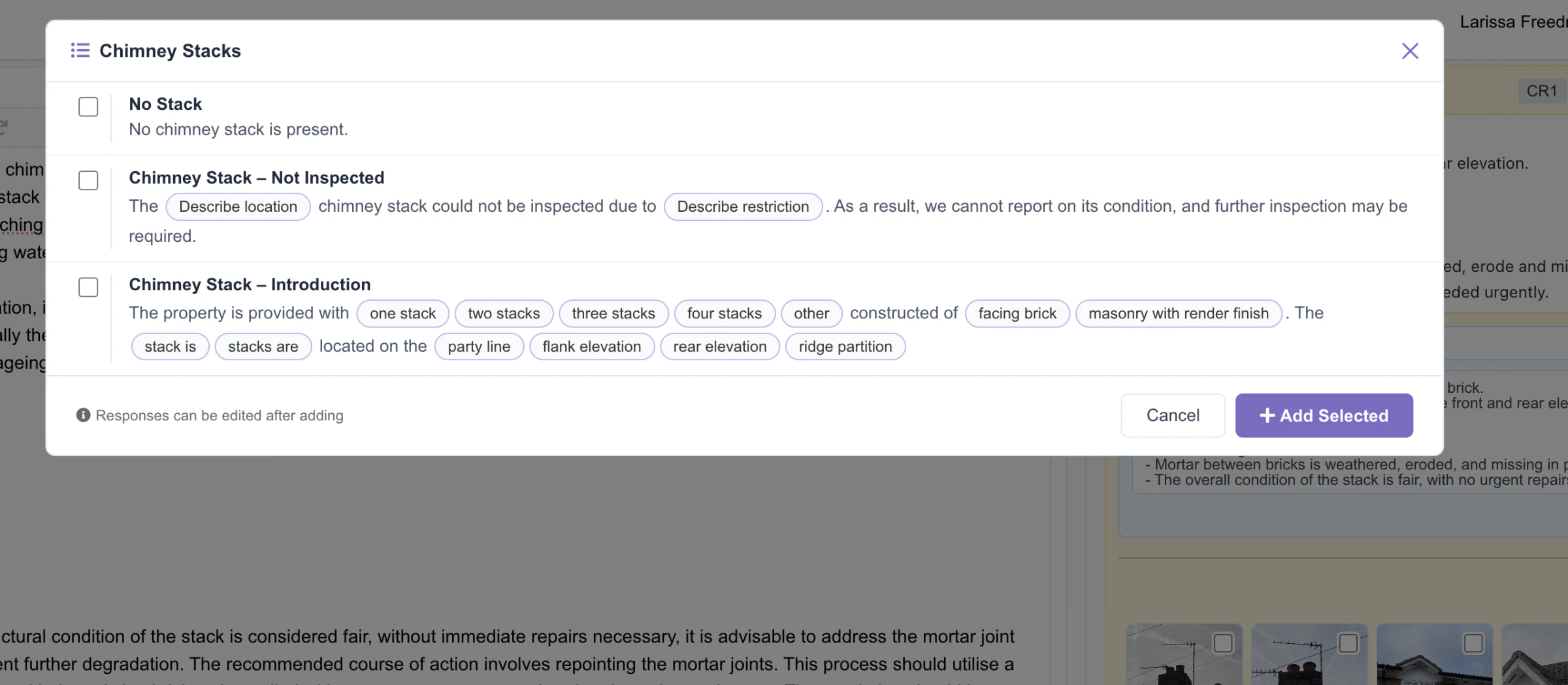
Inline Options work in a similar way to Responses, but are designed for shorter phrases or choices within a sentence. For example: The property was occupied / vacant.
The available options appear as selectable buttons within the Report Builder section, allowing the surveyor to insert the appropriate wording quickly. Inline Options are configured within the Template Master and can be tailored to the requirements of each report template.
Text formatting
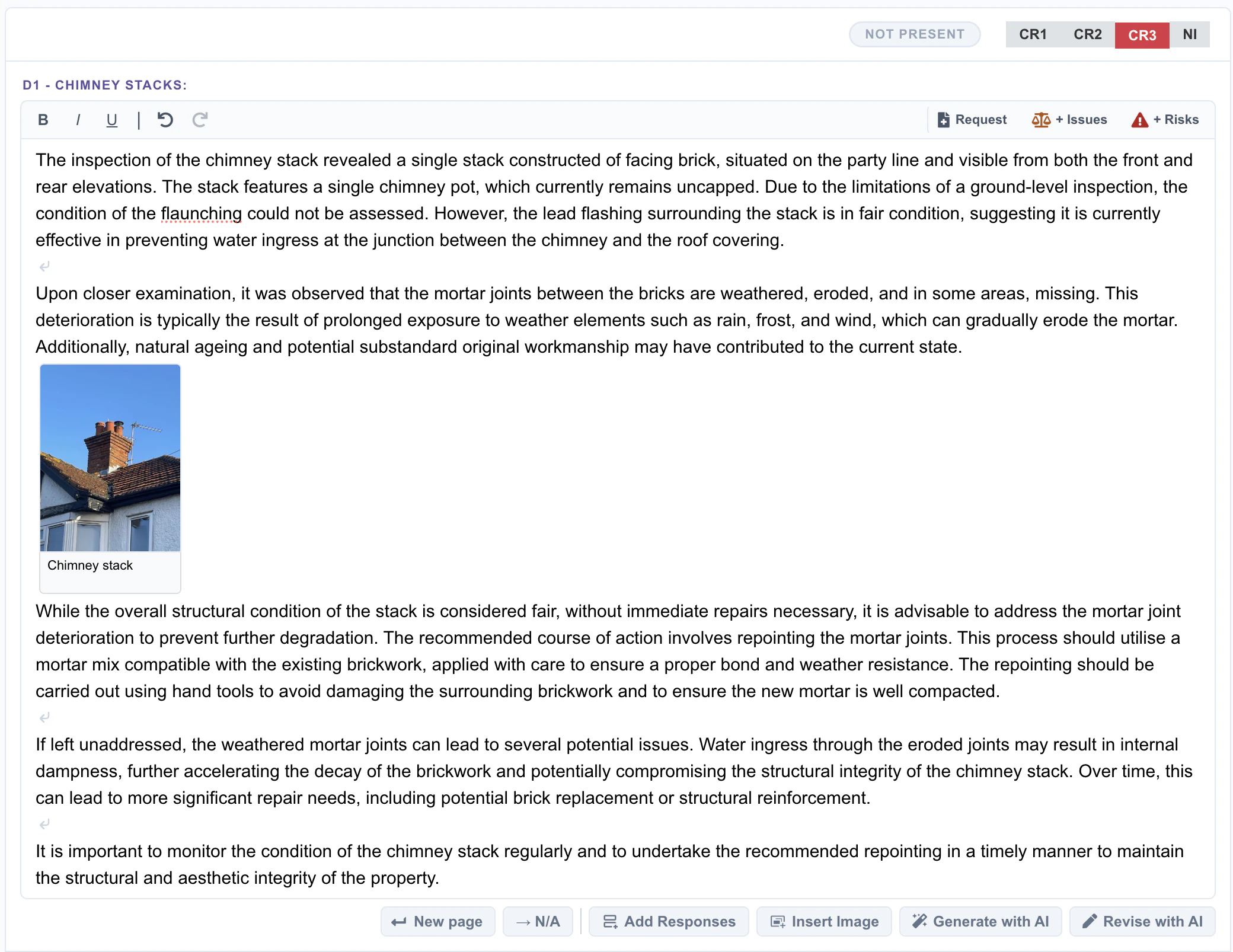
Report text can be formatted directly within the Report Builder using bold, italic and underline. This allows surveyors to emphasise information where required without leaving the reporting environment.
 Enlarge image
 Enlarge image
 Enlarge image
Risk, legal matters and required documents
Cross-referencing risk and legal matters
Text within a report section can be highlighted and cross-referenced directly to the relevant Risk or Legal section.
This allows important observations identified while writing one part of the report to be carried into the appropriate summary sections without having to retype the information.
Documents Required
Where an observation results in a document being required, the surveyor can highlight the relevant text and add it directly to the Documents Required table. This helps keep recommendations and required documentation connected to the original report observation.
Photographs and desktop research
Insert photographs directly into report sections
Surveyors can insert photographs directly into report text. Photographs stored within the inspection photo grids can be selected from within the Report Builder and added to the relevant section of the report.
Direct access to desktop research
The Report Builder provides direct access to the Desktop Research area for the property. This allows the surveyor to review the research already carried out without leaving the report. Associated screenshots and images collected during the research process are also available from within the Builder.
AI Copilot in the Report Builder
AI Copilot is optional and designed to support the surveyor during report writing without replacing professional judgement.
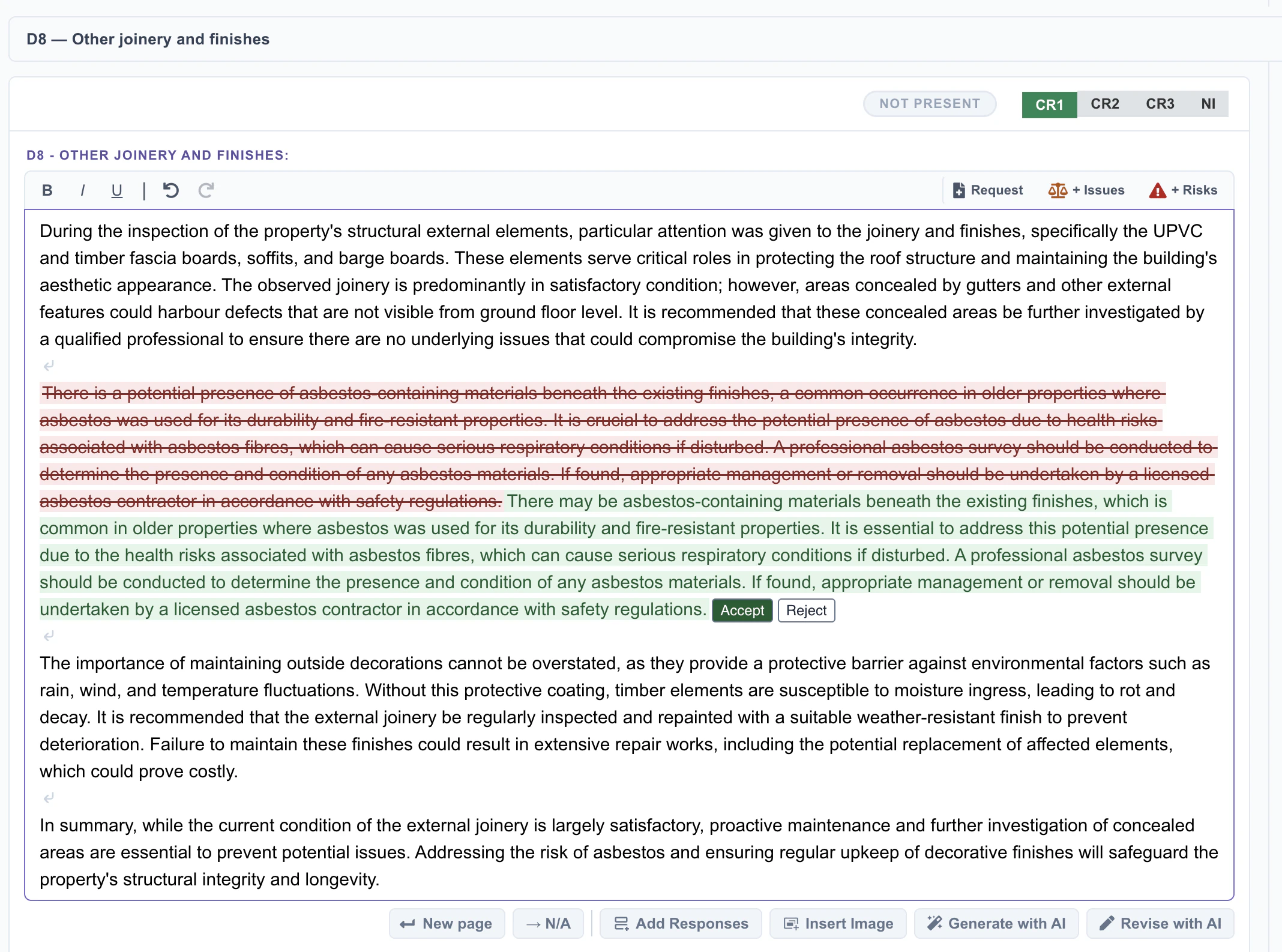
Within the Report Builder, Copilot can help summarise and organise inspection notes, revise existing paragraphs or report sections, and create a draft report section from information already recorded by the surveyor.
When inspection notes are summarised, Copilot reorganises and presents the information in a clearer, easier-to-read format. The original inspection notes remain available and continue to be the primary source of information.
Copilot is instructed to work from the information supplied by the surveyor and avoid adding unsupported assumptions or professional conclusions. Its purpose is to assist with the presentation and drafting of information supplied by the surveyor.
Any suggestion produced by Copilot must be reviewed by the surveyor, who can choose to Accept or Reject the proposed changes. The surveyor remains responsible for the professional judgement, conclusions and final content of the report.
SurvSync has designed Copilot to support responsible AI use, with reference to the RICS professional standard Responsible use of artificial intelligence in surveying practice. Each practice remains responsible for how AI is used within its own professional work.
 Enlarge image
Report completion and output
Report completion progress
SurvSync tracks the progress of the report as it is completed. The completion status is also reflected within the SurvSync Dashboard and, where enabled, the Client Portal.
The Report Builder also helps identify sections that have not yet been completed, reducing the risk of parts of the report being accidentally missed.
Surveyor Declaration
The Surveyor Declaration is automatically populated using the surveyor's profile information, including their name, professional titles and signature. This reduces repetitive administration while keeping the declaration consistent across reports.
PDF and Microsoft Word export
Completed reports can be downloaded as PDF. Where Word export is enabled for the report template, the report can also be downloaded in Microsoft Word format.
The Word version preserves the report's structure and supports further editing in Microsoft Word, giving surveyors additional flexibility where they prefer to make final edits or publish the report themselves.
Valuation Addendum
For report templates that include a Valuation Addendum, the section is available within the Report Builder and is included in the final report when it contains information. Where no content has been added, the empty addendum is omitted from the report output.
Related SurvSync features
See SurvSync in action
Book a demonstration of the platform.